
公司办公室有一台windows 10办公电脑,公司机房有一台ubuntu 22服务器,非工作时间我想在家里登录公司机房里的ubuntu 22服务器处理问题,显然不能直接从家里登录到公司机房的服务器,幸好有一台云上虚拟主机,于是自然而然想到局域网穿透技术。但是公司出口防火墙做了限制:除了实名登记在册的windows 10办公电脑能登录云主机外,办公室和机房的电脑都不能登录互联网上的电脑,参考下图所示。
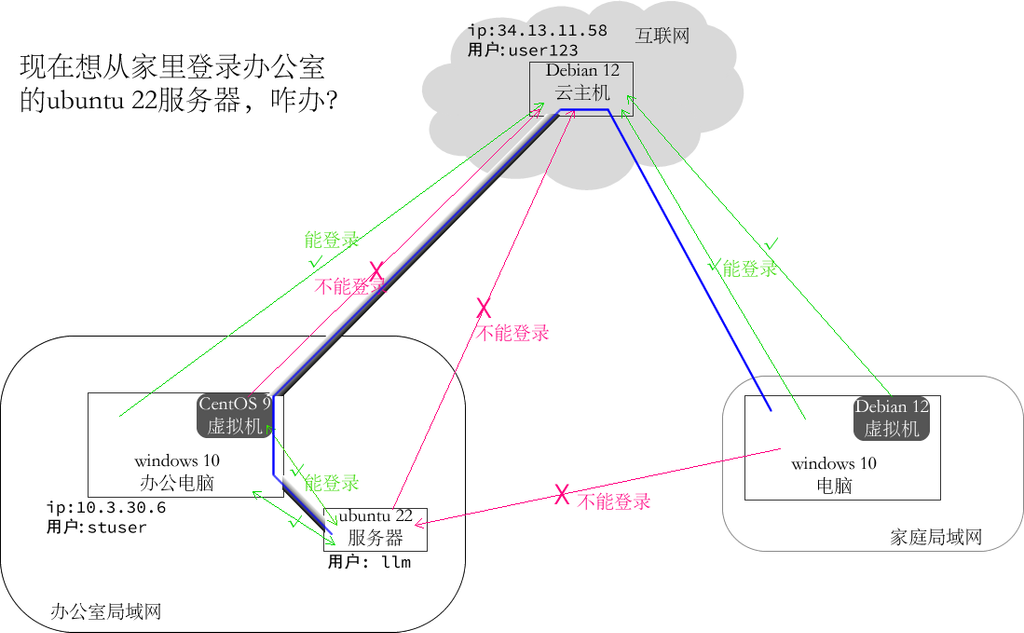
看来只好用windows 10办公电脑作为跳板了。
1. 在windows 10办公电脑上操作
以管理员运行powershell,然后执行下面几条命令部署openssh-server服务:
Add-WindowsCapability -Online -Name OpenSSH.Server~~~~0.0.1.0

Start-Service sshd

Set-Service -Name sshd -StartupType Automatic

New-NetFirewallRule -Name sshd -DisplayName "OpenSSH Server" -Enabled True -Direction Inbound -Protocol TCP -Action Allow -LocalPort 22

 netstat -an | findstr :22
2. 云主机上操作
vim /etc/ssh/sshd_config

……

AllowTcpForwarding yes

GatewayPorts yes

……


systemctl restart ssh
还要在云主机所在的平台上的防火墙中放行2222端口。
3. 办公室机房的ubuntu 22服务器上操作
apt install autossh -y

vim reverse-tunnel.sh

/usr/bin/autossh -M 0 -N -o "ProxyCommand=ssh stuser@10.3.30.6 -W %h:%p" -o "ServerAliveInterval=30" -R "8022:localhost:22" user123@34.13.11.58


chmod +x reverse-tunnel.sh

./reverse-tunnel.sh
……会提示输入windows用户stuser的密码和云主机上的用户user123的密码
默认autossh命令在前台运行,按Ctrl+z后输入命令bg把它切换到后台执行,这样前台就可以退出登录状态了。
最后在家里电脑上执行命令ssh -p 2222 llm@34.13.11.58登录到公司机房的ubuntu 22服务器上了。